Legal Land Description API Integration Guide
Integrate legal land description APIs into your applications. Convert LLDs to coordinates, add autocomplete search, process batch records, and display DLS/NTS grid maps. REST API with JSON responses.
Integrate Township Canada's legal land description services directly into your applications and workflows. Our REST APIs enable LLD-to-coordinate conversion, autocomplete search, batch processing, and interactive grid maps—all with simple JSON responses.
Quick start
Get an API key
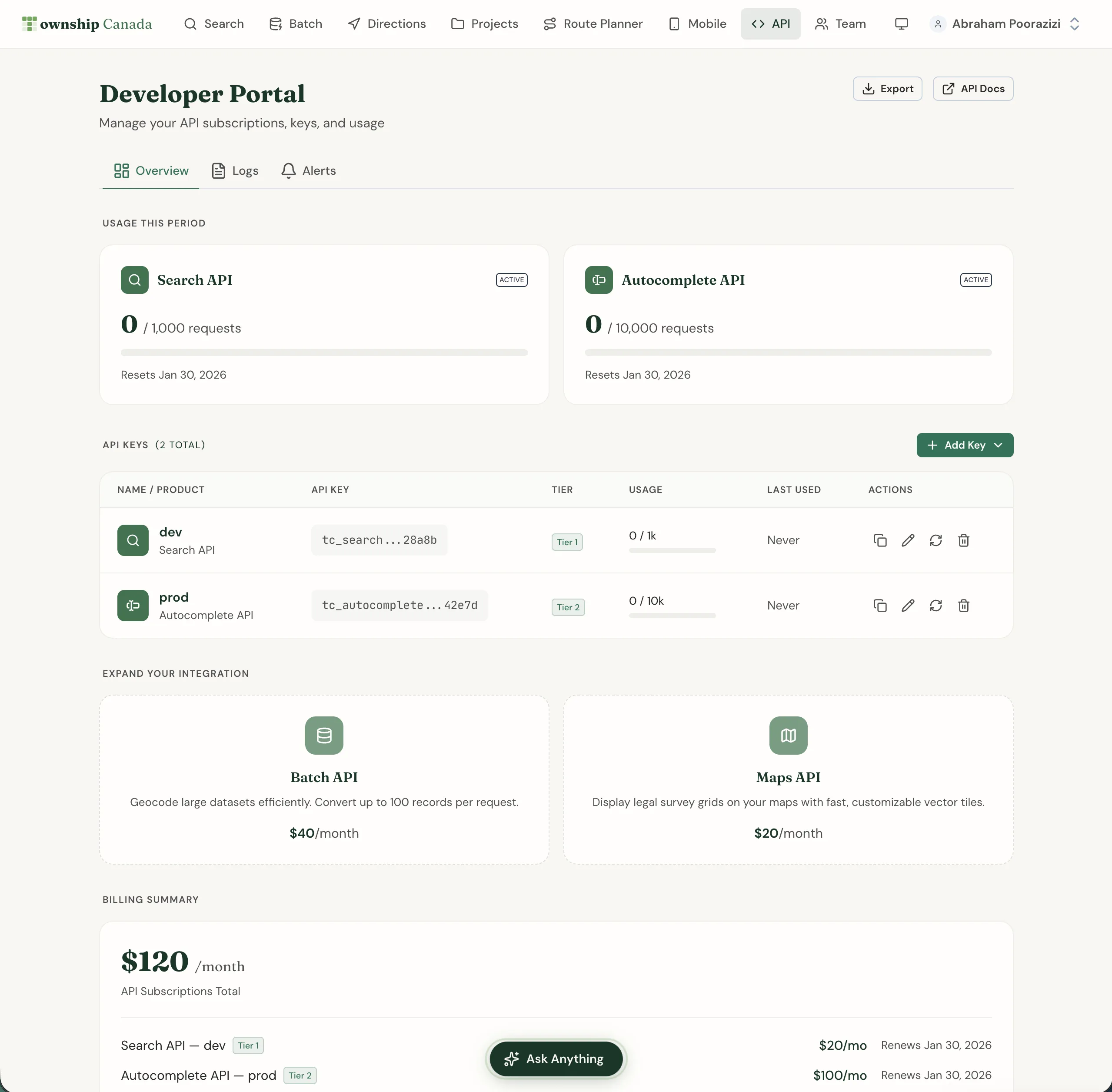
Log into your Township Canada account and go to API in the main navigation. Subscribe to an API endpoint and create your first API key.
Make your first request
Add your API key to the request header and make a test request.
Parse the response
All APIs return JSON with coordinates, legal descriptions, and metadata.
For full documentation and code examples, visit the API documentation.
API endpoints
Township Canada offers four distinct API endpoints:
Search API ($20/month)
Convert legal land descriptions to geographic coordinates and vice versa. Supports DLS, NTS, Geographic Townships, and FPS formats.
Use cases: Property lookup, coordinate conversion, reverse geocoding
Autocomplete API ($20/month)
Search legal land descriptions with partial text. Returns up to 10 matching results with coordinates—ideal for search boxes and type-ahead interfaces.
Use cases: Search boxes, type-ahead, field validation
Batch API ($40/month)
Process up to 100 records per request. Convert lists of legal land descriptions to coordinates or coordinates to legal land descriptions.
Use cases: Bulk data processing, migration, spatial analysis
Maps API ($20/month)
Display legal survey grids on maps in your web or mobile applications. Vector tiles format compatible with Mapbox GL, Leaflet, and other mapping libraries.
Use cases: Custom mapping applications, data visualization
API pricing tiers
Each API offers three pricing tiers:
Search, Autocomplete & Batch APIs
| Tier | Monthly Requests | Rate Limit | Price |
|---|---|---|---|
| Build | 1,000 | 1/sec | $20-40/mo |
| Scale | 10,000 | 5/sec | $100-200/mo |
| Enterprise | 100,000 | 25/sec | $500-1,000/mo |
Maps API (higher request quotas for tile rendering)
| Tier | Monthly Requests | Rate Limit | Price |
|---|---|---|---|
| Build | 10,000 | 1/sec | $20/mo |
| Scale | 100,000 | 5/sec | $100/mo |
| Enterprise | 1,000,000 | 25/sec | $500/mo |
Annual billing saves two months compared to monthly billing.
Common integration patterns
Real Estate Applications
Add legal land description lookup to property search interfaces. Use the Autocomplete API for type-ahead search and the Search API for coordinate conversion.
Oil & Gas Software
Integrate batch conversion for well location management. Use the Maps API to display DLS/NTS grids in custom mapping applications.
Mobile Field Apps
Add LLD search and coordinate conversion for field workers. The APIs work with any mobile development framework (React Native, Flutter, native iOS/Android).
GIS Platforms
Enhance ArcGIS, QGIS, or custom GIS tools with legal land description support. Batch API enables bulk coordinate conversion for spatial analysis.
Agriculture Technology
Add quarter section and LSD lookup to farm management software. Combine with soil and boundary data for precision agriculture applications.
Getting an API key
Open the Developer Portal
Go to API in the main navigation to access the Developer Portal.
Subscribe to an API
Click on the API you want to use (Search, Autocomplete, Batch, or Maps). Select a tier and complete payment.
Create an API key
Click + Add Key and give your key a descriptive name. Copy the key immediately—it won't be shown again.
Use your key
Include the API key in the x-api-key header for all requests.
Managing API subscriptions
Manage your API subscriptions from the API page in the main navigation. The Developer Portal provides:
- Overview: View all your API keys and subscriptions
- Logs: Monitor API requests with timestamps and response codes
- Alerts: Configure usage threshold notifications
Usage monitoring
Track your API usage in real-time from the Overview tab. Usage resets at the start of each billing period.
Rate limiting
Exceeding your rate limit results in HTTP 429 Too Many Requests responses. Implement exponential backoff in your integration to handle rate limits gracefully.
Quota management
When you reach your monthly quota, requests return HTTP 429 until the next billing cycle. Upgrade your tier for higher quotas or implement caching to reduce request volume.
Code examples
Access code examples in JavaScript, Python, and cURL from the Developer Portal. Each API endpoint includes ready-to-use code snippets you can copy and customize.
Checking system health
For the current status of Township Canada's APIs, including uptime, response time, and incident history, visit status.townshipcanada.com. This site provides real-time updates on API system health.
Related guides
- Account Management - Manage billing for API subscriptions
- Batch Conversion - Web interface for batch processing
- Interactive Maps - Map features available through the Maps API
townshipcanada- Official TypeScript SDK for Node.js developers
Need help with your integration? Contact us for technical support and custom API solutions.
Related Guides
Managing API Keys for Development, Staging, and Production
Create and manage multiple Township Canada API keys for different environments. Naming conventions, key rotation, environment variables, and CI/CD setup.
API Troubleshooting & Best Practices
Fix common Township Canada API errors including Forbidden responses, CORS issues, rate limiting, and empty results. Includes debugging tips and integration patterns.
Building Autocomplete Search with the Township Canada API
Build a search-as-you-type component for legal land descriptions using the Township Canada Autocomplete API. Includes debouncing, proximity biasing, and examples in vanilla JS and React.