Batch Convert Legal Land Descriptions - 5,000+ Records
Convert thousands of legal land descriptions to GPS coordinates and vice versa in seconds. Export to CSV, KML, Shapefile, DXF, or GeoJSON. Perfect for oil & gas, real estate, GIS, and agriculture.
Process up to 5,000 legal land descriptions in a single session. Township Canada's batch conversion tool instantly converts bulk LLDs to GPS coordinates (and vice versa), enriches data with province names, administrative boundaries, oil & gas fields, and soil characteristics, then exports to Excel, Google Earth, CAD, or GIS formats.
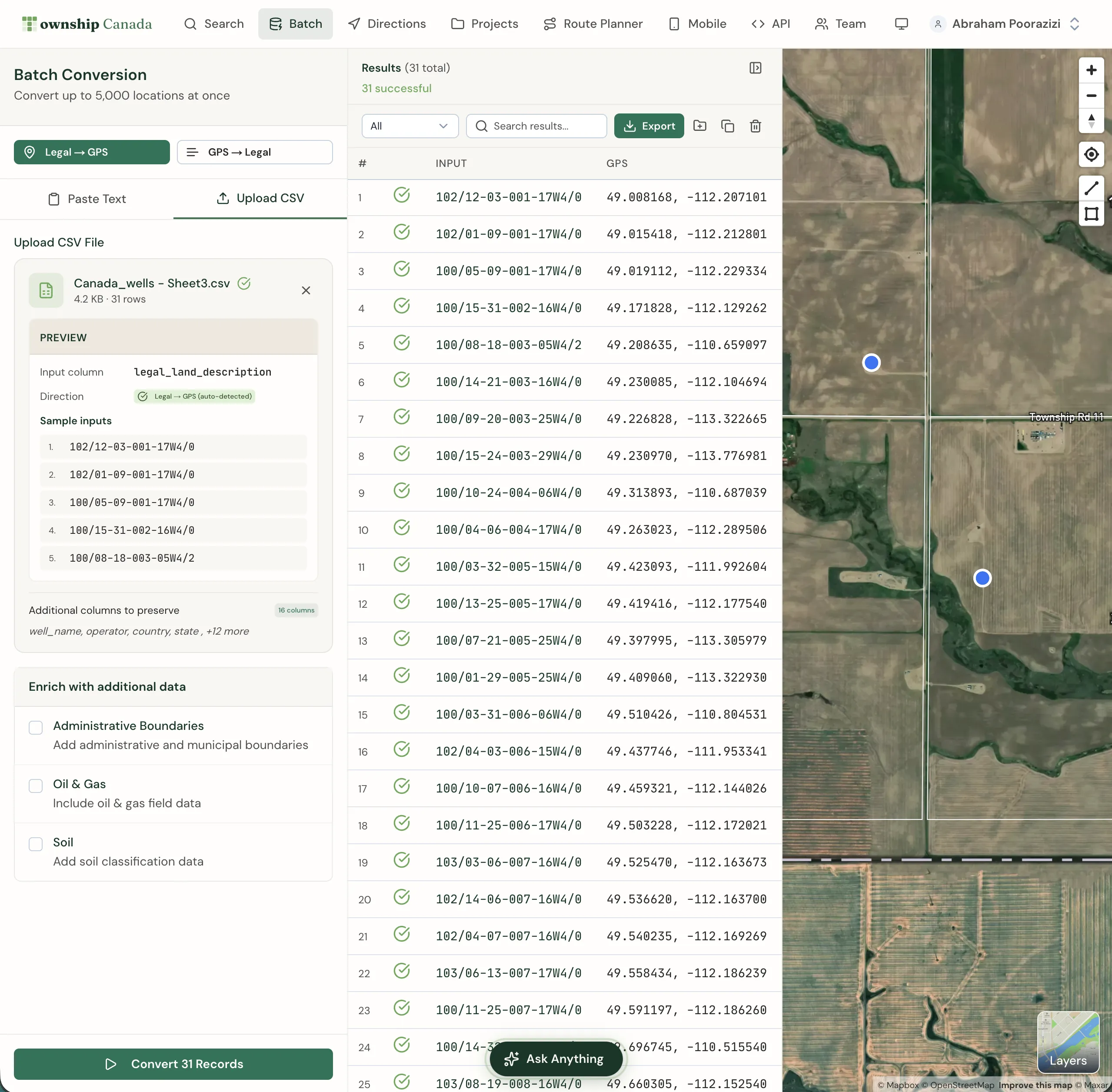
Why use batch conversion?
- Speed: Convert thousands of records in seconds, not hours
- Accuracy: Uses official survey grid data for precise conversions
- Data enrichment: Add province names, administrative boundaries, oil & gas field data, and soil characteristics
- Flexible export: Download results in PDF, CSV, KML, Shapefile, DXF, or GeoJSON formats
- Map visualization: Display all results on an interactive map instantly
Plan requirements
Batch conversion is available on the Business plan, which includes a monthly allowance of successful batch records and CSV upload. Only records that convert successfully count; failed rows and retries do not. See pricing for the current allowance, and Enterprise for high-volume operational workloads.
Access batch conversion from the Batch link in the main navigation menu.
Who uses batch conversion?
Oil & Gas Industry
Energy companies use batch conversion to convert well locations, pipeline routes, and lease boundaries between legal land descriptions and GPS coordinates. Enrich results with oil & gas field data for comprehensive site analysis.
Real Estate & Land Management
Real estate professionals convert property legal descriptions to coordinates for mapping, due diligence, and portfolio management. Export to Google Earth for client presentations.
GIS & Surveying
GIS analysts and surveyors process large datasets of legal land descriptions for spatial analysis, land use planning, and boundary verification. Export directly to Shapefile or GeoJSON for integration with ArcGIS, QGIS, and other platforms.
Agriculture
Farmers and agronomists convert field boundaries and parcel information, enriching data with soil characteristics for precision agriculture and crop planning.
Converting legal land descriptions to coordinates
Select the conversion direction
Click Legal → GPS to convert legal land descriptions to geographic coordinates.
Enter your data
Choose your input method:
- Paste Text: Enter legal land descriptions directly, one per line
- Upload CSV (Business only): Upload a CSV file with a column of legal land descriptions
Click Sample to load example data and see the expected format.
Configure enrichment options
Select additional data to include with your results:
- Administrative Boundaries: Add municipal and administrative boundary information
- Oil & Gas: Include oil & gas field data
- Soil: Add soil classification data from Soil Landscapes Canada
Convert
Click Convert Records to process your data. Results appear in the table and on the map.
Converting coordinates to legal land descriptions
Select GPS → Legal to convert geographic coordinates into legal land descriptions. Enter coordinates in decimal degrees format (e.g., 51.454928, -114.648933), one per line.
Input formats
Legal land descriptions
The batch tool accepts all formats supported by Township Canada:
- DLS: 25-24-1-W5, SW-25-24-1-W5, SW 25 24 1 W5
- NTS: A-2-F/93-P-8, 93P08
- Ontario: Lot 2 Con 4 Osprey
- River Lots: RL-103-PA, PL-G-KI
You can mix different formats in the same batch.
GPS coordinates
Enter coordinates in decimal degrees:
51.454928, -114.648933
52.123456, -113.987654
The order of latitude and longitude is interchangeable.
Viewing results
Converted results display in a table showing:
- Original input
- Legal land description
- Province/territory
- Latitude and longitude
- Enrichment data (if selected)
Click on any result row to highlight it on the map. Use the table controls to sort, filter, and paginate large result sets.
Displaying results on the map
Results automatically display as markers on the map. Click View on any result to zoom to that location. The map shows all conversion results simultaneously, helping you visualize the spatial distribution of your data.
Saving results to Projects
Save batch conversion results to a Project for future reference:
- Click the Save to Project button above the results table
- Select an existing project or create a new one
- Choose which results to save (all or selected)
Saved results appear in your Projects with all enrichment data preserved.
Downloading results
Export conversion results in multiple formats:
- PDF: Formatted report with all location details
- Enhanced CSV: Preserves all columns from your uploaded CSV and appends conversion results alongside the original data
- CSV: For spreadsheet applications like Excel
- KML: For Google Earth visualization
- Shapefile: For GIS software like ArcGIS and QGIS
- GeoJSON: For web mapping applications
- DXF: For CAD applications
Click the Download dropdown button and select your preferred format.
Frequently Asked Questions
How many records can I convert at once?
Township Canada's batch conversion tool can process up to 5,000 legal land descriptions in a single session. Batch conversion is available on the Business plan with unlimited records.
What legal land description formats are supported?
The batch tool supports all formats available in Township Canada: Dominion Land Survey (DLS), National Topographic System (NTS), Geographic Townships, and Federal Permit System (FPS). You can mix different formats in the same batch.
Can I upload a CSV file?
CSV upload is available on the Business plan. Click the Upload CSV tab and select a file from your computer. The tool automatically detects the column containing legal land descriptions.
Can I convert coordinates back to legal land descriptions?
Yes. The batch conversion tool works both ways. Select GPS → Legal to convert GPS coordinates to legal land descriptions.
What export formats are available?
Business users can export batch results to PDF, Enhanced CSV, CSV, KML, Shapefile, GeoJSON, and DXF formats. Enhanced CSV preserves your original columns and appends the conversion results.
What data enrichment options are available?
You can enrich batch results with administrative boundary information, oil & gas field locations, and soil characteristics from the Soil Landscapes Canada database. Province/territory names are included by default.
Is there a batch conversion API?
Yes. The Batch API allows you to integrate batch conversion into your own applications. Process up to 100 records per API call with automatic rate limiting and quota management.
Need to integrate batch conversion into your own applications? Check out our API integration guide for developer documentation.
Related Guides
AI Assistant - Ask Questions About Legal Land Descriptions
Use Township Canada's AI Assistant to convert legal land descriptions, get directions, validate formats, ask about a parcel's wells, soil, crops, and flood history, and learn about DLS, NTS, and Geographic Township systems through natural conversation.
Using Township Canada for Delivery & Field Route Planning
Plan efficient delivery routes and field visits using legal land descriptions. Convert LSD lists from spreadsheets, visualize stops on a map, and get driving directions.
Export to PDF, CSV, KML, Shapefile, GeoJSON, and DXF
Download search results, batch conversions, and saved projects in multiple formats. Compatible with Excel, Google Earth, ArcGIS, QGIS, and CAD software.