DLS, NTS Grid Maps - Interactive Canadian Survey Maps
Interactive maps with DLS grids for Alberta, Saskatchewan, Manitoba; NTS grids for BC; Geographic Townships for Ontario; and FPS grids for NWT and Nunavut. Includes satellite imagery and data layers.
Township Canada provides interactive maps displaying Canadian survey grid systems including Dominion Land Survey (DLS), National Topographic System (NTS), Geographic Townships, and Federal Permit System (FPS). Visualize legal land descriptions on street maps or high-definition satellite imagery, with additional data layers for oil & gas fields, administrative boundaries, and soil characteristics.
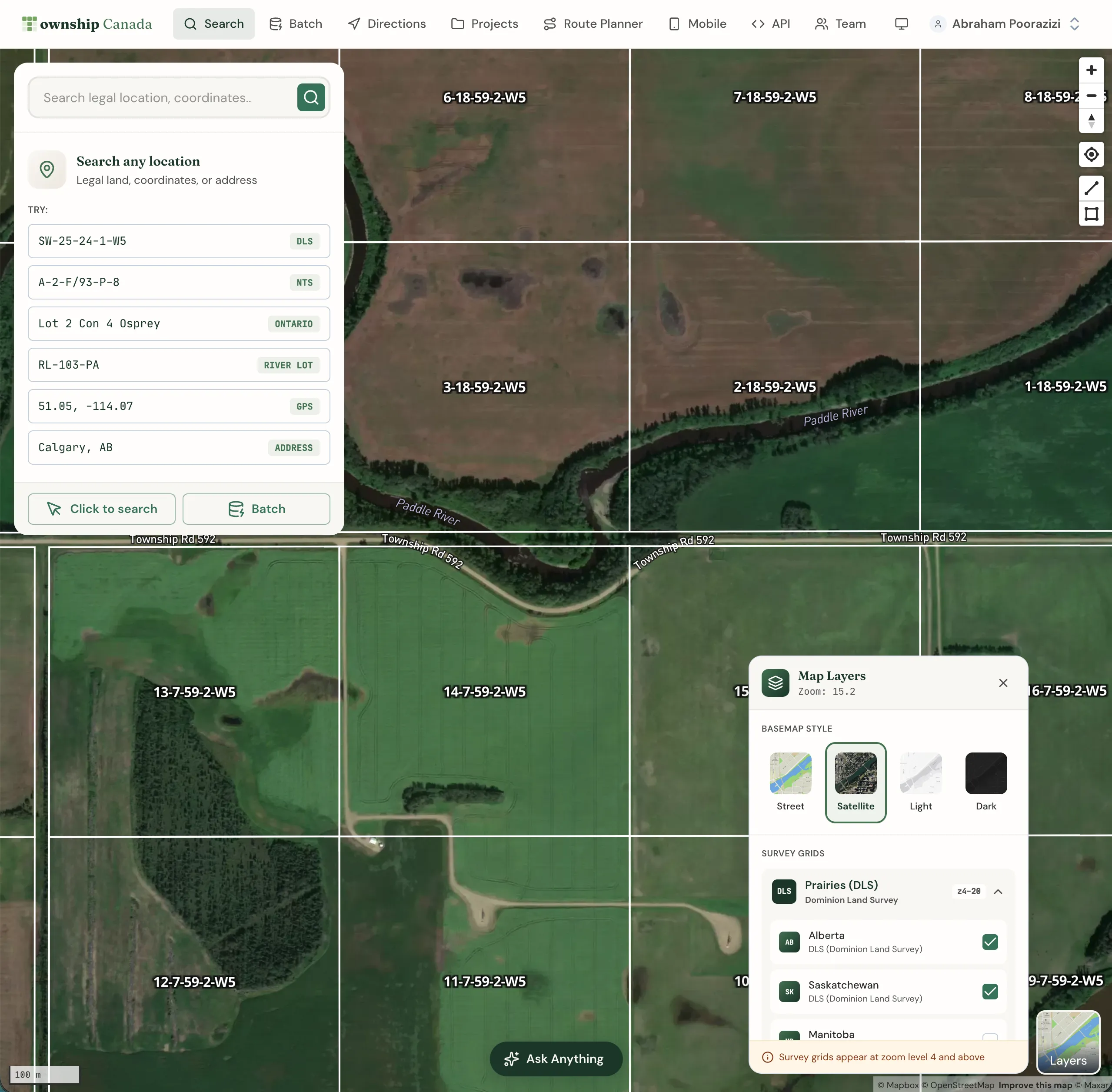
Survey grid coverage by province
Alberta & Saskatchewan (DLS)
View the complete Dominion Land Survey grid system covering Alberta and Saskatchewan. Navigate by Township, Range, Section, Quarter Section, and LSD (Legal Subdivision). The DLS grid extends from the US border (Township 1) to the Northwest Territories border (Township 126).
British Columbia (NTS)
The National Topographic System grid covers British Columbia with Map Series, Map Areas, Map Sheets, Blocks, Units, and Quarter Units. Essential for forestry, mining, and oil & gas operations in BC.
Manitoba (DLS + River Lots)
Manitoba features both the DLS grid system and the historic River Lot/Parish Lot system along the Red and Assiniboine rivers. Township Canada displays both systems for complete coverage.
Ontario (Geographic Townships)
Explore Ontario's Geographic Township system showing Concessions and Lots. The grid visualization helps navigate Ontario's unique land survey heritage from the original Crown land allocations.
Northwest Territories, Nunavut & Offshore (FPS)
The Federal Permit System grid covers the Northwest Territories, Nunavut, and Canada's offshore areas including the Atlantic, Pacific, and Hudson Bay regions. Critical for oil & gas exploration and northern operations.
Who uses Township Canada maps?
Oil & Gas Industry
Visualize well locations, pipeline routes, and lease boundaries on DLS/NTS/FPS grids. Overlay oil & gas field data layers for comprehensive site analysis. Export map views to share with stakeholders.
Real Estate & Land Surveying
View property boundaries within the survey grid context. Combine street maps with satellite imagery to assess land parcels and surrounding areas.
Agriculture & Forestry
Navigate to field locations using legal land descriptions. Overlay soil characteristic data from Soil Landscapes Canada for precision agriculture and land management decisions.
Government & Environmental
Access administrative boundary layers, aboriginal lands data, and environmental zones for regulatory compliance and planning purposes.
Navigation controls
The map includes intuitive navigation controls located on the right side of the screen:
- Zoom in/out: Adjust your view of the map
- Reset bearing: Return the map to north-facing orientation
- Find my location: Display your current location on the map
- Measure distance: Measure distances between points
- Measure area: Calculate the area of drawn shapes
You can also navigate using your mouse or touchpad:
- Pan by clicking and dragging
- Zoom with scroll wheel or pinch gesture
- Rotate by right-clicking and dragging
Base map layers
Switch between different base map styles using the Layers button in the bottom-right corner of the map:
- Street: Default street map with roads, cities, and landmarks
- Satellite: High-definition satellite imagery (Pro and Business plans)
- Outdoors: Topographic map with terrain features
- Light: Minimal light-themed map
- Dark: Dark-themed map for reduced eye strain
Grid layers
Toggle survey grid overlays from the Layers panel:
- DLS Grid: Dominion Land Survey (Alberta, Saskatchewan, Manitoba)
- NTS Grid: National Topographic System (British Columbia)
- Geographic Townships: Ontario township boundaries
- FPS Grid: Federal Permit System (NWT, Nunavut, offshore)
Your layer preferences are saved in your browser, so the same layers activate each time you visit.
Data catalog layers
The map includes additional data layers for analysis:
- Administrative Boundaries: Provincial, municipal, and census boundaries
- Oil & Gas Fields: Petroleum field locations and boundaries
- Aboriginal Lands: First Nations reserves and treaty areas
- Soil Characteristics: Soil classification from Soil Landscapes Canada
Access these layers from the Layers panel. Data layers can be combined with grid layers for comprehensive analysis.
For data layers not currently available, contact us with your request.
Measurement tools
Use the measurement tools to calculate distances and areas:
Distance measurement
- Click the Measure distance button on the right toolbar
- Click on the map to place measurement points
- The total distance displays as you add points
- Double-click to complete the measurement
Area measurement
- Click the Measure area button
- Click to place polygon vertices
- The area calculates as you draw
- Double-click to complete the shape
Measurements display in metric units (kilometers, square kilometers).
Related guides
- Search & Convert Locations - Find legal land descriptions by LLD, coordinates, or address
- Maps API - Display grid maps in your own application
Related Guides
Supported Coverage & Regional Limitations
Which provinces and territories does Township Canada cover? Understand coverage by survey system, resolution limits, and known gaps in Winnipeg and unsupported provinces.
Get Directions to Legal Land Descriptions | LSD Navigation
Get driving directions to legal land descriptions, LSDs, and quarter sections. Navigate to remote well sites, field locations, and rural properties using DLS or NTS coordinates with turn-by-turn instructions.
Dominion Land Survey (DLS) System Explained
Complete guide to the Dominion Land Survey system used in Alberta, Saskatchewan, Manitoba, and BC. Learn about townships, ranges, sections, and meridians.