How to Convert Legal Land Description to GPS Coordinates
Convert legal land descriptions to GPS coordinates instantly for Alberta, Saskatchewan, Manitoba, BC, and Ontario. Supports DLS, NTS, and Geographic Township systems with online lookup.
To convert a legal land description to GPS coordinates, enter your LLD (e.g., SW 25 24 1 W5) into Township Canada's search box and press enter. The tool instantly returns latitude/longitude coordinates, displays the location on a map, and provides the option to export results in CSV, KML, or other formats.
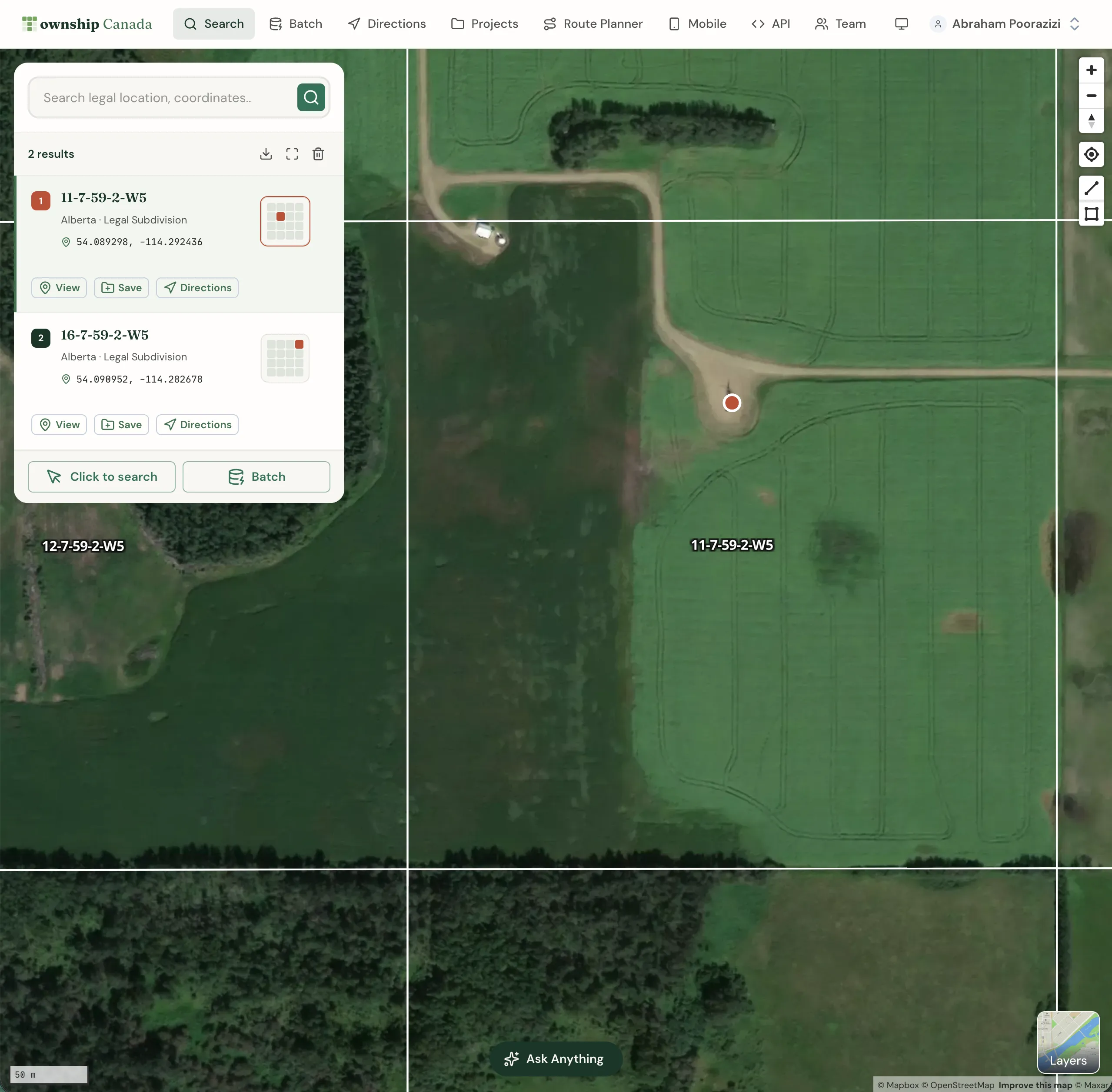
Township Canada's intelligent search box enables you to locate millions of places across Canada using legal land descriptions (LLDs), addresses, or geographic coordinates. It supports various survey grid systems, geographic coordinates, and addresses. Visit our about page to learn more about the supported search queries.
Using the search box
The search box is the primary tool for finding locations on the map. It is located in the left panel on desktop or in a bottom drawer on mobile devices.
To search:
- Click the search box and type your search query
- As you type, suggestions appear based on your input
- Select a suggestion or press Enter to search
Search results appear both on the map and in the left panel. Each result displays the legal land description, geographic coordinates, and province.
Search result actions
Each search result card includes action buttons:
- View: Zoom to the location on the map
- Save: Add the location to Quick Saves or a Project
- Directions: Get turn-by-turn directions to this location
Click the result card to see additional details and the location's polygon boundary on the map.
Searching by legal land description
Township Canada accommodates various survey grid systems like Dominion Land Survey (DLS), National Topographic System (NTS), Geographic Townships, and Federal Permit System (FPS), each with its unique format for legal land descriptions.
Inputting a complete legal land description isn't mandatory; a partial description will also prompt suggestions. Choose a suggestion or press Enter to search with your input. Separate components of a legal land description with spaces, hyphens, or both (e.g., SW 25 24 1 W5, SW-25-24-1-W5, or SW 25 24-1W5).
Province-specific examples
Alberta and Saskatchewan (DLS System)
The Dominion Land Survey system covers Alberta, Saskatchewan, and parts of Manitoba. Examples of valid search formats:
- Section-Township-Range-Meridian: 25-24-1-W5
- Quarter Section: SW 25 24 1 W5 or SW-25-24-1-W5
- LSD (Legal Subdivision): 7-25-24-1-W5
British Columbia (NTS System)
British Columbia uses the National Topographic System. Example format:
- Quarter Unit-Unit-Block/Map Series-Map Area-Map Sheet: A-2-F/93-P-8
Manitoba (DLS + River Lots)
Manitoba uses both DLS and the River Lot/Parish Lot system:
- DLS: SW 25 24 1 W1
- River Lots: RL-103-PA, PL-G-KI, OT-54-BO
Ontario (Geographic Townships)
Ontario uses the Geographic Township system with Concessions and Lots:
- Township: Osprey
- Concession Township: Con 4 Osprey
- Lot Concession Township: Lot 2 Con 4 Osprey
Searching by geographic coordinates
Find locations using geographic coordinates such as GPS coordinates in formats like decimal degrees (e.g., 51.454928, -114.648933) and degree minute seconds (e.g., 51°27'17.7"N 114°38'56.2"W). The order of latitude and longitude is interchangeable, so both 51.454928, -114.648933 and -114.648933, 51.454928 are valid.
Searching by place names, addresses, or postal codes
To locate places and addresses, enter the name of a place, an address, or a postal code. The search box offers a list of suggestions as you type. Select a suggestion or press Enter to search with your current input.
Searching by clicking on the map
Find legal land descriptions, geographic coordinates, and addresses by clicking directly on the map. Select the Click to search button in the search panel, then click on your desired location. The results appear on the map and in the left panel.
Saving search results
Save locations from search results for future reference:
- Click the Save button on the search result card
- Choose Quick Saves or select a specific Project
- Add optional notes and categories
See the Projects guide for more about organizing saved locations.
Downloading search results
Download search results in various formats. Click the download button at the top of the results panel and select your preferred format:
- PDF: Formatted report (Pro and Business)
- CSV: For spreadsheet applications (Business)
- KML: For Google Earth (Business)
- Shapefile: For GIS software (Business)
- GeoJSON: For web mapping (Business)
- DXF: For CAD applications (Business)
Need to convert many locations at once? Check out our batch conversion guide to process thousands of records simultaneously.
Frequently Asked Questions
How do I convert a legal land description to GPS coordinates?
Enter your legal land description (e.g., SW 25 24 1 W5) into the Township Canada search box. The tool instantly converts it to GPS coordinates (latitude and longitude) and displays the location on the map. You can then copy the coordinates or download them in various formats.
What legal land description formats are supported?
Township Canada supports Dominion Land Survey (DLS) for Alberta, Saskatchewan, and Manitoba; National Topographic System (NTS) for British Columbia; Geographic Townships for Ontario; and Federal Permit System (FPS) for Northwest Territories, Nunavut, and offshore areas.
Can I convert GPS coordinates to a legal land description?
Yes. Enter GPS coordinates in decimal degrees (51.454928, -114.648933) or degrees-minutes-seconds format (51°27'17.7"N 114°38'56.2"W) to find the corresponding legal land description.
Is Township Canada free to use?
All web plans are paid: Starter (100 searches), Pro with unlimited searches and PDF export, and Business with batch conversion and all export formats. There is no free tier: any account requires a paid plan. The mobile field app is included with every paid plan at no extra cost. Visit our pricing page for current prices.
What file formats can I download results in?
Pro plans support PDF export. Business plans add CSV, KML, Shapefile, GeoJSON, and DXF formats. Starter plans do not include export options.
How accurate is the legal land description lookup?
Township Canada uses official survey grid data to provide accurate legal land descriptions. The tool covers all provinces and territories with survey grid systems, including the latest updates to grid boundaries.
Related Guides
Supported Coverage & Regional Limitations
Which provinces and territories does Township Canada cover? Understand coverage by survey system, resolution limits, and known gaps in Winnipeg and unsupported provinces.
Get Directions to Legal Land Descriptions | LSD Navigation
Get driving directions to legal land descriptions, LSDs, and quarter sections. Navigate to remote well sites, field locations, and rural properties using DLS or NTS coordinates with turn-by-turn instructions.
Dominion Land Survey (DLS) System Explained
Complete guide to the Dominion Land Survey system used in Alberta, Saskatchewan, Manitoba, and BC. Learn about townships, ranges, sections, and meridians.