Every Alberta Well Licence Has a Legal Land Description — Here's How to Convert It
Alberta well licence legal land descriptions are embedded in every UWI. Learn how to read the location component and convert it to GPS coordinates.
A new AER well licence lands on your desk: licence number 0548321, surface location LSD 14-27-048-05W5. The field crew is heading out this afternoon for an initial site assessment, and they need GPS coordinates for their navigation system. The licence lists the location as a legal land description — a string of numbers that means nothing to a handheld GPS.
This is a routine scenario for anyone working in Alberta oil and gas. Every well licence issued by the Alberta Energy Regulator includes an alberta well licence legal land description as the official surface location. That location is also embedded inside the Unique Well Identifier (UWI) that follows the well through its entire lifecycle — from application to abandonment. Knowing how to read it and convert it to coordinates you can actually use in the field is a basic but critical skill.
How the Legal Land Description Sits Inside a UWI
Alberta's UWI format follows a standard pattern. A typical UWI looks like this:
100/14-27-048-05W5/0
Breaking it down:
- 100 — Location exception code (100 means bottom-hole at surface location)
- 14 — Legal Subdivision (LSD)
- 27 — Section
- 048 — Township
- 05 — Range
- W5 — West of the 5th Meridian
- 0 — Event sequence number
The location component — 14-27-048-05W5 — is a standard DLS (Dominion Land Survey) legal land description. It identifies a specific 40-acre parcel: Legal Subdivision 14 of Section 27, Township 48, Range 5, West of the 5th Meridian. That's a piece of land roughly 20 kilometres west of Rocky Mountain House in west-central Alberta.
Every alberta well licence legal land description follows this same structure. Once you can read the UWI, you can pull the location out of any well licence, drilling spacing unit order, or AER compliance document.
Converting a Well Licence LSD to GPS Coordinates
If you enter 14-27-048-05W5 into Township Canada's LSD converter, you get back the centre-point GPS coordinates for that legal subdivision — approximately 52.3725, -114.7983. That's a lat/lng pair you can drop directly into Google Maps, a Garmin unit, or any GIS application.
Here's what happens in practice:
- Pull the LSD from the well licence or UWI: 14-27-048-05W5
- Enter it into Township Canada's search tool
- Get back the GPS coordinates and see the parcel on the map
- Copy the coordinates to your navigation device or field report
The coordinates are calculated from official survey data, accurate to the parcel centre. For a 40-acre LSD, that puts you within roughly 200 metres of any point within the parcel — close enough to find the access road and confirm the staked location.
You can also go the other direction. If you're standing at a well site with GPS coordinates from a field visit, enter the lat/lng to get back the corresponding legal land description. This is useful when verifying that a well is drilled at the licensed location or when recording GPS observations against the correct LSD in your field notes.
When One Location Becomes Hundreds
A single well licence is straightforward. But Alberta oil and gas companies rarely deal with just one location at a time.
Consider these real scenarios:
- Lease block review: A company holds mineral rights across 24 sections in the Pembina field. That's up to 384 LSDs that need mapping for a development plan.
- Pipeline corridor: A proposed gathering system runs from LSD 03-15-042-04W5 to LSD 09-22-043-04W5, crossing roughly 40 quarter sections. Environmental assessment requires GPS coordinates for every parcel along the route.
- Quarterly AER filings: A mid-size producer reports on 150+ active wells each quarter. Verifying that each well's reported location matches its licence means processing 150 legal land descriptions.
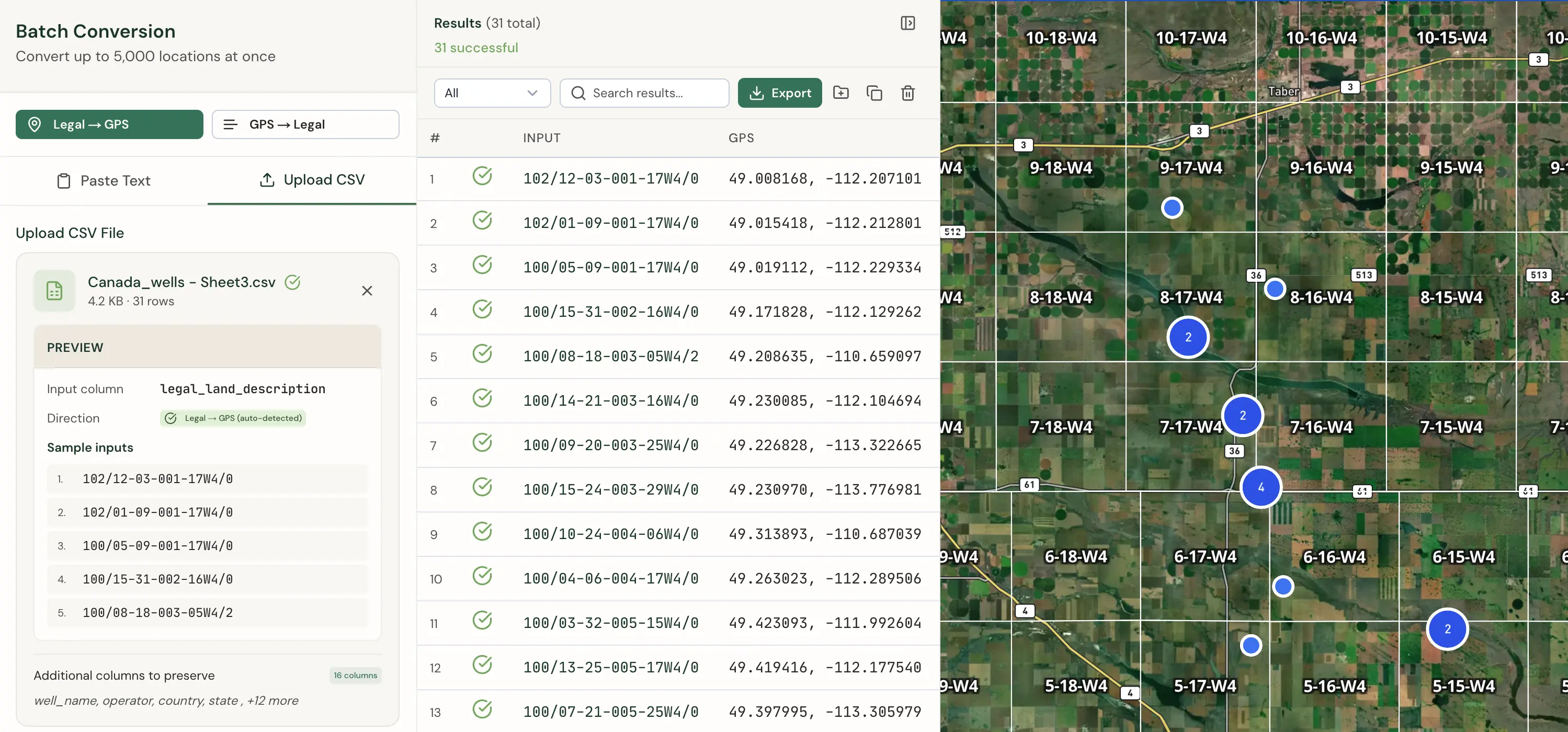
Doing these conversions one at a time in a spreadsheet is tedious and error-prone — a transposed range number or wrong meridian sends a crew to the wrong location. Township Canada's batch conversion tool handles this by accepting a CSV file of legal land descriptions and returning GPS coordinates for all of them at once. Upload 500 LSDs, get 500 coordinate pairs back in seconds. The output includes a processing report that flags any descriptions that didn't match, so you can catch data entry errors before they reach the field.
Export Formats for AER Reporting and GIS
Once you've converted your locations, you need the results in a format your downstream systems can use. Township Canada supports multiple export formats:
- CSV — Import directly into Excel, Access databases, or custom reporting tools used for AER submissions
- KML — Open in Google Earth to visualize well locations and lease blocks on satellite imagery
- Shapefile — Load into ArcGIS, QGIS, or other GIS platforms for spatial analysis and mapping
- GeoJSON — Use in web-based mapping applications and custom dashboards
- DXF — Import into AutoCAD for engineering drawings and site plans
For AER regulatory work, CSV is the most common choice — it integrates directly with the spreadsheets and databases most land departments already use. For field operations, KML files let supervisors see every well location plotted on a satellite map before dispatching crews.
Getting the Alberta Well Licence Legal Land Description Right
Accuracy matters. A wrong LSD on a well licence application can delay AER approval. A transposed township number in a field dispatch can waste an entire day of crew time. And a mismatched location in an environmental assessment creates compliance risk.
The DLS system has been the foundation of land administration in Alberta since the original survey in the 1880s. It isn't going anywhere — every new AER well licence, every surface lease agreement, and every mineral rights transaction still references a legal land description. Having a reliable way to move between those descriptions and GPS coordinates is part of the job.
If you need to convert a single LSD from a well licence, Township Canada's converter does it in seconds. If you're processing hundreds of locations for a lease review or regulatory filing, the batch tool and CSV export will save you the manual work. See pricing and plan options to find the right fit for your workflow.